




AWS vs Azure vs Google: Which Is the Best Cloud Platform For Your Business?
Planning to Build a Robust App? How Will You Host It?
When building an app, you expect it to manage users, synchronize data across devices, store and share data, and provide real-time stats, among other tasks.
To help your app perform all these tasks seamlessly, you need a perfect hosting service that allows you to build scalable mobile apps and backend infrastructure without having to be caught up in the intricacies of managing servers.
That’s where cloud hosting comes into play. The industry “Cloud Computing” has grown to a huge extent in the last few years because of its unbeatable computing power, reliability, and unmatched scalability.
More and more businesses are adopting the cloud at one point or another. And because of the same, the industry is booming. Now, the question is which cloud platform you should use to host your web or mobile app?
While the cloud computing market is flooded with numerous cloud service providers – Amazon AWS, Microsoft Azure and Google Cloud platform are the leaders of the domain. If you are confused between the three of them and can’t find out which one you should use, this blog is for you.
Here, we will discuss AWS vs Azure vs Google Cloud Platform to conclude which is best among the three. So, let’s get started.
How to Choose the Perfect Cloud Platform for Your Startup?
Selecting a cloud platform isn’t the easiest thing, especially if you haven’t used any of them before. That’s why you should check best practices and ask for recommendations from other business owners or developers who have experience with cloud-based app development.
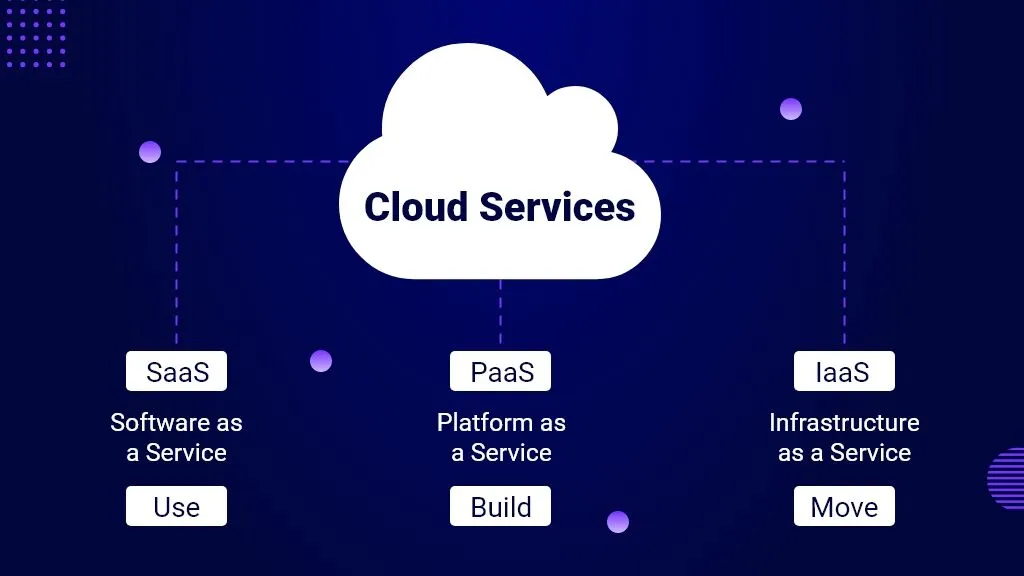
Also, before you go to select a cloud service provider, you must know which type of cloud platform you require. There are three types of cloud services and they are:
- SaaS (Software as a Service):Software as a Service is described as the software provided over the internet as a service and typically on a membership basis. SaaS solutions are the best alternatives that are acceptable when your business is time-sensitive and isn’t prepared to develop your own infrastructure to create and deploy the applications.
Utilizing a SaaS solution is a very smart idea if you are working on a short-term project or in a temporary collaboration. It is perfect for end-users.
- PaaS (Platform as a Service):Platform as a Service (PaaS) is described as a service that provides you a ready software environment for developing and deploying applications.
Such services also give you the required tools for the exact configuration of the development environment: operating systems, hardware, middleware, databases and tools for testing and coding.
There are a lot of advantages to using PaaS – you have to write less code for your project, it provides you flexibility and many tools that make development much more convenient and simpler. That is the reason PaaS is often viewed as one of the essential components for building eCommerce apps.
However, with PaaS. you’ll still need developers who can work for you on database arrangement, frontend, and business logic. PaaS is ideal for software developers. But, if you don’t have resources, you can go with SaaS.
- IaaS (Infrastructure as a Service):Infrastructure as a Service provides online access to resources like networking systems, data storage and cloud servers for deploying projects and operating systems. This is acknowledged through virtualization, without developing and maintaining your own infrastructure.
In other words, it is just like leasing a physical server, just on the internet. With IaaS, you get the highest level of personalization, full control of infrastructure, and, obviously, scalability. It is ideal for IT administrations.
Now that you know what SaaS, PaaS, and IaaS mean and which cloud service you require for your business, let’s see which cloud service provider is best to avail these services.
With these definitions in mind, let’s explore the offerings of the top cloud platforms.
Amazon Web Services (AWS) – Features, Pricing, Pros, and Cons
Amazon Web Services, popularly known as AWS, is a cloud computing platform by Amazon. The service provides its users with a mix of IaaS and Paas services. In addition, it offers SaaS services also as packaged software. Let’s analyze AWS depending on the features it provides and pricing.
Features
AWS offers almost every feature that comes under cloud computing. Their cloud services enable you to get simple access to data storage, computing power, and other functionality essential for application developers.
AWS has numerous products that fall under numerous classes. They offer developer tools, mobile services, management tools and app services. The application services combined with the computing and database infrastructure are basic necessities for a successful enterprise app development team. Here are some of the stunning features that AWS provides:
Mobile-Friendly Access: AWS Mobile Hub supports and helps you in deciding the appropriate and compatible feature for your application.
It incorporates a console that helps you access AWS services that incorporate development, testing, and maintenance of the mobile application. It incorporates clear approaches to choose and configure mobile application features like content delivery and push notifications.
Utilizing AWS Mobile SDK, your application can directly get to Amazon Web Services, for example, S3, DynamoDB, and Lambda. The Mobile SDK supports Android, iOS, Web, React Native, and many more.
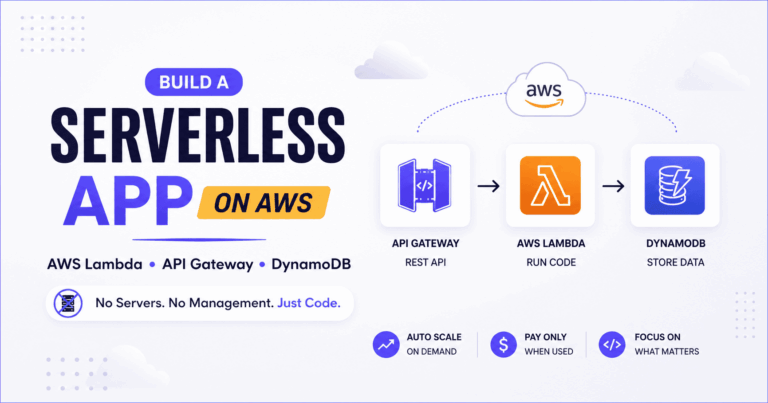
Serverless Cloud Functions: Amazon API and Amazon Gateway help developers by executing their code and scaling it. AWS Serverless Cloud Functions help the client so that they can focus just on building the application. Server management is done by AWS alongside it, it performs scaling, patching and also the management of the infrastructure.
Databases: Amazon gives access to databases as per requirements and the database given by them is managed by them completely. Some of the databases and their uses are described below:
- For transactional purposes, relational databases can be used.
- Non-Relational Database is used for internet-scale applications.
- Data Warehouse for Analytics.
- In-memory data stores are used for caching & real-time workloads.
- Graph databases are used for applications with highly connected data.
Storage: Storage is one of the flexible, economical and easy to use features provided by Amazon. The storage function provided by AWS can be utilized freely as well as in combination to meet your prerequisite. Below mentioned are the storage functions provided by AWS:
- Amazon glacier which is used for long-term storage.
- Amazon’s basic storage service provides scalable object storage for analytics and data backup.
- The Amazon EBS provides block storage options that can be used for persistent data storage with EC-2 instances.
As a number of companies rely on AWS, Amazon provides maximum security to ensure data safety. The features AWS provides let customers innovate and scale.
Pricing
Amazon’s pricing is very mysterious. While it has a cost calculator on its website, the many factors involved in calculating the fee make it hard to get exact estimates. As per Gartner, Amazon’s pricing structure is complex and the use of third-party cost management tools is recommended.
Pros
AWS offers the most vigorous services and features, global footprints and partner ecosystem. It ranks in the top position when it comes to security, monitoring, reliability, platform configuration options, and policy features. AWS is continually adding new services and upgrading existing ones with new abilities. Here are some of its advantages:
- Most mature and comprehensive cloud service provider.
- Extensive global presence and partner ecosystem.
- Recommended for scalable and virtualized environments.
Cons
But, if a hybrid cloud strategy is imperative to your business, AWS may miss the mark when compared with Azure. Another caution with AWS is its scale. Smaller organizations may find it hard to explore the extensive portfolio of services, and some see AWS similar to a complex cloud service provider to manage. Here are some of its disadvantages:
- Complex pricing and navigation.
- Requires advanced expertise to manage.
- Limited hybrid cloud support compared to Azure.
Microsoft Azure – Features, Pricing, Pros, and Cons
Azure is Microsoft’s cloud computing platform and infrastructure intended to develop, deploy and manage various applications and services through a giant network of data centers managed by Microsoft. It was released on February 1st, 2010 with the name Windows Azure. Later on, it was renamed to Microsoft Azure on 25th March 2014. Let’s see AWS depending on the features it provides.
Features
Like AWS cloud services, Azure offers a full assortment of services for application development needs. The platform enables you to deploy and manage virtual machines. In Azure, you can do your work and computation at whatever capacity you require under just a minute.
Additionally, if your custom software needs to run large-scale computing, it can deal with it as well. This is really a remarkable feature of Azure and AWS over the Google Cloud Platform. All Azure features integrate into your current existing frameworks and procedures, offering more power and capacity for enterprise development. Every one of the important elements that is used to develop a virtual network and deliver applications or services to a worldwide audience are accessible with Azure, including:
- Virtual Machines (VMs): Host applications and services on cloud-based VMs.
- SQL Databases: Fully managed relational databases reduce hardware and software costs.
- Active Directory Integration: Enables seamless security management and group policies.
- Storage: Safe, scalable data storage with cost-effective options for infrequently accessed data.
Pricing
Microsoft Azure doesn’t make things any simpler when it comes to pricing. Because of Microsoft’s complex software licensing alternatives and utilization of situation based discounts, its pricing structure can be hard to understand without outside assistance as well as extensive experience.
Pros
- Seamless integration with Microsoft’s ecosystem.
- Strong hybrid cloud capabilities.
- Improved support for Linux and open-source technologies.
Cons
- Complex configurations require advanced expertise.
- Historical reliability issues.
- Limited scalability for large implementations.
Google Cloud Platform (GCP) – Features, Pricing, Pros, and Cons
Google’s cloud platform gives a solid and exceptionally scalable framework for developers to develop, test and deploy applications. It covers application, storage and computing services for backend, portable and web solutions. More than four million apps trust and utilize the platform at present. Let’s explore its features, pricing, pros, and cons.
Features
- Compute Engine: Offers high-performance VMs with persistent disk storage.
- App Engine: Provides tools for quick app development and deployment.
- Cloud SQL: Fully managed MySQL database.
- Cloud Storage: Durable, globally accessible object storage with edge-caching.
Pricing
Google’s pricing is its biggest strength. It aims to offer cost-effective pricing techniques that beat the prices of other suppliers. As per Gartner, Google utilizes deep discounts and flexible terms to try to win ventures from customers that are as of now spending a huge amount of money while working with other cloud providers.
Pros
- Strong reputation in open-source and machine learning.
- Ideal for big data applications and cloud-native startups.
- Simple pricing model.
Cons
- Limited enterprise-focused services.
- Small partner ecosystem.
- Rigid contract negotiations.
AWS vs Azure vs Google Cloud Platform: Which Is Best for You?
 Attributes Attributes |
 Amazon Web Services Amazon Web Services |
 Microsoft Azure Microsoft Azure |
 Google Cloud Platform Google Cloud Platform |
|
|---|---|---|---|---|
| 1 | Features & Services | 140+ Cloud Services 19 Global Regions |
600+ Services 54 Global Regions |
75+ Cloud Services 18 Global Regions |
| 2 | Compute Capabilities | Amazon Elastic Compute Cloud | Virtual Machines | Compute Engine |
| 3 | Customer Base | Netflix, Airbnb, Expedia | Adobe, HP, NBC News | Twitter, Paypal, Bloomberg |
| 4 | Hybrid Support | Provides hybrid support through partnerships with on-premises providers | Comprehensive hybrid cloud support and capabilities | Introduced Hybrid Cloud Support in 2018 |
| Services Include: VMware Cloud on AWS, AWS Storage Gateway | Services Include: Azure Stack, Hybrid SQL Server, Azure StorSimple | Services Include: Cloud Service Platform, Google Kubernetes Engine | ||
| 5 | Deploying Apps and PaaS | Offers app deployment solutions but lacks in-app hosting | Extensive app deployment and hosting services | Includes developer tools but has fewer PaaS capabilities |
| 6 | Open Source Developer Capabilities | Contributes to Linux, Kubernetes & more | Recently acquired GitHub | Created over 2,000 open source projects. Leads in OSC. |
| 7 | Pricing | Per-sec billing for EC2 and several other services | Per-second billing on container instances only | Per-second billing |
Key Insights
- AWS: Best for scalability and mature offerings but complex to manage.
- Azure: Ideal for businesses already using Microsoft tools.
- GCP: Best for startups, machine learning, and analytics-driven projects.
Where to Go?
There are endless factors to consider when comparing cloud service providers. If you’re feeling confused, it is a good option to step back and see what your business needs. And, the services of which cloud platform aligns with your business needs.
However, in today’s multi-cloud world, you shouldn’t try to find a single winner but rather how to ideally distribute tasks across various CSPs. As you outline your multi-cloud strategy, remember that in the key classes of storage, management tools, and computing, AWS and Azure offer a more mature stack than GCP.
All in all, the services and products of AWS are the most advanced and comprehensive, however, they can also be difficult to manage and navigate. Additionally, consider that if your organization is as of now utilizing Microsoft’s tools, servers, and office profitability applications, you will find it extremely easy to integrate with Azure.
Still unsure? Contact our experts to guide you through the process of selecting and implementing the right cloud platform for your business.

Be the first to leave a comment!